One chain language.
Every visual output.
Every system.
LiquiFire OS powers everything from a single promotional product personalizer to the visual infrastructure behind some of the world's largest commerce operations. Product configurators, dynamic imaging, 3D and AR, embroidery production, and web-to-print — all authored in a single LiquiFire Chain™ and served from one engine.
One request. Every source. Every output.
A single LiquiFire Chain™ call acquires assets from any source, pulls live data, executes ordered commands, and returns any output format, all as a standard HTTPS response.
Built on open standards. No migration required.
LiquiFire OS runs on open image, metadata, communication, security, and business standards, with proprietary rendering technology on top. Systems connect over HTTPS. Nothing needs to move before go-live.
Data and assets live where your organization put them.
Organizations are not built around a single system. Assets exist in DAMs, PIMs, S3 buckets, local servers, and third-party platforms because different teams, stakeholders, and processes put them there for reasons that have nothing to do with your image rendering infrastructure. Business data — stock levels, pricing, customer attributes, segment flags — lives in ERPs, CRMs, and product feeds for the same reason. LiquiFire OS does not ask you to change that. LiquiFire OS fetches from wherever things are, at the moment a render is requested, and delivers the result without requiring anything to move first.
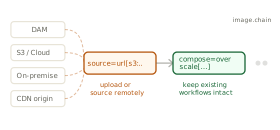
Assets stay where they are.
LiquiFire OS fetches source assets from any location at render time. PIM, DAM, S3, remote HTTPS, and local Resident Assets are equal sources. The chain controls acquisition and output — fetch, transform, and store — without a migration project before go-live.
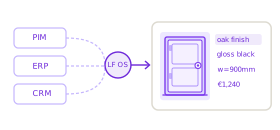
Live data at every render.
Variables are resolved at request time from JSON, XML, or TSV feeds. ERP inventory counts, CRM segment flags, GeoIP location data, and PIM attributes all become chain variables. No staging. No republishing. The render reflects business state at the moment the URL is called.
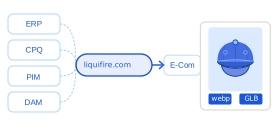
Headless by default.
Every capability is exposed over HTTPS. Any system that can form a URL can call it. Requests return standard RFC7234-compliant cache objects. No SDK, no runtime to install, no version negotiation.
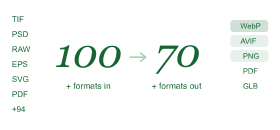
100+ in. 70+ out.
Input formats span raster, vector, embroidery, and 3D. Output formats span web image, print-ready PDF, CMYK TIFF, embroidery machine files, video frames, and data outputs. One engine. Every format your organization needs to produce.
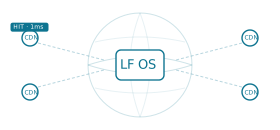
Three cache layers, CDN-native output.
LiquiFire OS maintains an asset cache, a render cache, and a tile cache internally. LiquiFire OS delivers rendered outputs as standard RFC7234 HTTP cache objects that propagate to any CDN without custom integration. Cache invalidation is precise, not blanket.
Multi-tenant by design.
Tenant-specific chains, brand rules, asset namespacing, and domain routing allow multiple white-label clients to operate from the same engine instance. Each tenant sees its own branded visual environment with no cross-contamination of assets, chains, or output.
Your infrastructure, your rules.
LiquiFire OS deploys across six models. In every model, assets can be sourced from your LiquiFire Resident Assets account, remote URLs, PIM, DAM, S3, or internal systems — the chain language and integration work are identical across all of them.
Hosted Service
LiquiFire OS managed by LiquidPixels across four data centers. Source assets from your LiquiFire Resident Assets account, remote URLs, PIM, DAM, or S3. Fastest path to production.
- Billerica MA, Amsterdam, AWS US-East-1, EU-West-1
- Metered by requests, GiB transferred, GiB storage
- LiquidPixels managed, monitored, and maintained
- Fault-tolerant, redundant architecture
Imaging Servers
LiquiFire OS on your hardware, inside your network. Source assets from Resident Assets on the same hardware, remote URLs, or any connected system. Standalone or clustered topology.
- Standalone, cache node, or clustered render topology
- Automated Resident Assets synchronisation across nodes
- Source from local storage, remote URLs, PIM, DAM, or S3
- No external egress required for core operation
Secure Enclave
LiquiFire OS with zero external network egress. Assets sourced exclusively from on-premise Resident Assets and internal systems. Designed for classified, regulated, and sensitive environments.
- Zero external egress, no cloud dependency of any kind
- FIPS-compatible configuration available
- AI Packs route to internal model endpoints only
- CORS restricted to authorized origins only
LiquidPixels Data Centers
LiquidPixels-owned Imaging Servers in LiquidPixels facilities. Source assets from Resident Assets, remote URLs, or connected systems. Your capital equipment, operated by LiquidPixels.
- LiquidPixels hardware in LiquidPixels facilities
- Capital purchase with required support agreement
- Full monitoring, management, and maintenance by LiquidPixels
- Physical infrastructure you own, operations handled for you
Customer Cloud
LiquiFire OS in a dedicated private environment on AWS. Source assets from Resident Assets, remote URLs, PIM, DAM, or S3. Customer-exclusive, not shared tenancy.
- Dedicated private environment, not shared tenancy
- Elastic capacity metered by instance time
- AWS hosted, additional providers on roadmap
- Full chain language compatibility, no operational difference
Hybrid
On-premise Imaging Servers combined with LiquidPixels-hosted capacity. Each layer sources assets independently. Route workloads by sensitivity, volume, or geography.
- On-premise handles baseline or sensitive workloads
- Hosted capacity absorbs burst or overflow traffic
- Same chain language across both layers, no rewriting
- Traffic routing configurable per chain or per origin
If it can form a URL, it works with LiquiFire OS.
A Shopify storefront, a custom configurator, an email campaign, a print workflow, a mobile app, and an enterprise ERP backend all integrate the same way: an HTTP GET to a chain URL. No SDK. No runtime dependency. No version to keep synchronized with the calling system.
For teams that need live data inside the render — stock levels, pricing, personalisation attributes, segment flags — external feeds pull directly into the chain at request time via jsonacquire and xmlacquire. No intermediary service. No custom integration layer to maintain. And equally, chains work without any of that: a single product image and a chain URL is enough to start.
LiquiFire OS can fetch source assets from any platform and can write rendered outputs back. You choose where assets live — LiquiFire OS works with that decision rather than around it.


Raster, vector, PSD, PDF, SVG, embroidery (DST/EMB/Wilcom), 3D, and document types.
Web image, print-ready PDF, CMYK TIFF, video frame, embroidery machine file, and data outputs.
HTTP GET. Any system that can form a URL integrates.
A recipe. Ingredients, steps, and a result.
A LiquiFire Chain™ is a sequence of commands executed in order by LiquiFire OS. Ingredients are the images, fonts, and data. Commands are the steps. The output is whatever the business requires, for whoever is asking, rendered live at the moment of request.
lpi?set=sku[MG-001],color_code[185C],customer_name[Alex],fmt[webp]&call=url[file:personalizer.chain]
Direct, macro, and non-imaging commands.
Direct commands manipulate the current image. Macro commands combine multiple operations into a single call, including database queries, calculations, conditionals, and loops. Non-imaging commands manipulate metadata associated with the request. All three types compose freely within a single chain.
Conditional and loop execution.
Every command in LiquiFire OS supports an if argument. If the condition evaluates false, the step is skipped. The for command repeatedly calls a chain until an expression is false, with an incrementing iterator passed to each call. This is data-driven imaging logic, not scripting in a wrapper language.
Start simple. Extend without rewriting.
A chain that starts as a single product colorizer can grow to include live data, conditional badges, multi-format output, and subroutine calls — without replacing what was already there. Foundation chains, reusable building blocks stored in Resident Assets, mean one update propagates everywhere the chain is called.
Every context. One command set.
LiquiFire OS operates in raster, vector, and embroidery contexts natively, switching as the chain requires. The same command set applies across all three — whether the output is a web image for a product configurator, a print-ready PDF for a promotional campaign, or a machine file for an embroidery factory.
Pixel-precise control, at any depth.
JPEG, PNG, TIFF, WebP, AVIF, GIF (including animation), PSD, and raw pixel formats. RGB and CMYK color models with ICC profile management throughout. Full alpha channel support. Multi-frame images handled natively, with individual frame selection and manipulation. EXIF and IPTC metadata preserved, accessible, and writable within any chain.
source=url[pim:('global.sku').tif],name[base]
colorspace=icc[sRGB],profile[embed]
sink=format[webp],quality[90]
PostScript, PDF, and SVG preserved as vector.
LiquiFire OS operates in a vector context when the source is PostScript, EPS, or PDF, preserving resolution independence, maintaining fonts as vectors, and keeping embedded raster images at scale. Metadata values from the job are injectable into PostScript execution. PDF pages are individually addressable as chain inputs. CMYK PDF output for print workflows is native, not a conversion.
source=url[dam:labels/('global.sku').pdf],page[1]
colorspace=cmyk,profile[ISOcoated_v2]
sink=format[pdf],quality[press]
From machine file to customer preview and back.
LiquiFire OS reads embroidery formats including DST, EMB, and the full range of Wilcom design formats. The Wilcom API integration provides both Wilcom Create Mode (generating embroidery objects from scratch) and Wilcom Customize Mode (modifying color, design, and objects within an existing design). The customer-visible preview and the production-ready machine file are produced by the same chain.
source=url[dam:('global.ref').emb]
wilcom=customize[colorway],thread[('global.pantone')]
sink=format[dst]
Color accuracy built into the rendering layer.
LiquiFire OS provides ICC color management throughout. Images carry color profiles from acquisition through manipulation to output. Color space conversions are explicit and controllable. LiquiFire Colorization integrates Pantone, RAL, and PPG color library data directly into chains, producing rendered images that match real-world product specifications, not approximations computed at display time.
source=url[pim:('global.sku').tif]
colorize=library[pantone],color[('global.pantone')]
sink=format[webp],quality[92]
Production text as a chain command.
The LiquiFire text rendering engine supports alternate glyphs, precise font metric management, rich text formatting, full Unicode including currency, mathematical, and musical symbols, and multiple language support. Text rendered in a chain follows production constraints. The personalized overlay a customer approves is the specification the factory receives, with no gap between what is shown and what is produced.
source=url[pim:('global.sku').tif]
annotate=font[Garamond],gravity[center],text[('global.name')],size[48]
sink=format[webp]
Detection, infill, QR, and object-aware operations.
The command set includes object and feature detection, generative infill, QR code generation, image mapping (pixel-to-texture mapping with optional lighting), fabric drape simulation using LiquidPixels grid files, and watermarking. These are chain commands, not external tools requiring separate API calls or separate workflow steps.
source=url[pim:('global.sku').tif]
removebg=model[ai-precise]
composite=url[assets:lifestyle-bg.jpg]
sink=format[webp]
Named solutions built directly on the engine.
Each tool in the LiquiFire OS suite addresses a specific capability context. Every tool uses the full LiquiFire Chain API, adds purpose-built value on top, and reduces the time between requirement and production. No separate platform. No separate integration.
LiquiFire Surround
Interactive 3D object navigation using WebGL. LiquiFire OS applies dynamic, data-driven textures to 3D models in real time, so color, material, and configuration changes render live inside the viewer without reloading the model.
Desktop and mobile. WCAG compliant. Works with the full chain API so any chain-driven color, material, or data variable feeds directly into the 3D surface.
- Real-time texture and material changes via chain variables
- 360° orbit, zoom, and hotspot support
- AR output for iOS (USDZ) and Android (GLB)
- Complete JavaScript API for headless integration
LiquiFire Viewer Suite
Four viewer modules, usable individually or in combination. LiquiFire Resolve is built in for automatic delivery optimization. No limits on visualization size. Retina-aware. WCAG compliant.
- Collection — thumbnail navigation with active product state
- Magnify — lens-style zoom on hover, no separate image required
- Zoom — full-resolution deep zoom with pan
- Motion — frame-by-frame product rotation from a sprite sequence
Each module is configured via XML and exposed through a complete JavaScript API. Integrates with any LiquiFire Chain.
LiquiFire Embroidery Suite
Embroidery visualization and direct-to-production file generation via the Wilcom API. The customer-visible preview and the machine-ready file come from the same chain call. No separate step between approval and dispatch.
- Wilcom Create Mode — generate embroidery objects from scratch
- Wilcom Customize Mode — modify colorways and design objects in existing files
- Reads DST, EMB, and the full range of Wilcom design formats
- Outputs machine-ready DST alongside customer-facing WebP in a single chain
LiquiFire Colorization
Photorealistic product colorization driven by Pantone, RAL, and PPG color library data integrated directly into the chain. The rendered image matches real-world product specifications, not browser approximations.
- Pantone, RAL, PPG library integration — color code to rendered image
- Full ICC color management, CMYK-safe output
- Applies across the full product range from a single base image
- Accurate enough for color approval workflows — no physical sample required
LiquiFire Resolve
Automatic true image optimization. Resolve analyzes the calling browser and device environment and delivers the correctly scaled, formatted, and compressed image without per-device configuration.
- Automatic WebP, AVIF, JPEG format selection by browser capability
- Device pixel ratio and container-aware scaling
- Lazy-load support built in
- Integrates with any LiquiFire Chain — a single line addition
LiquiFire Orb
The web-based management environment for LiquiFire OS. Four workspaces covering every operational dimension of a running installation.
- Configure — server, engines, cache, licenses, SSL
- Monitor — performance metrics, request activity, behavior logs
- Manage — assets, chains, fonts, color profiles, data feeds
- Tools — chain authoring, testing, and live preview
Available to both hosted service and on-premise deployments. Fully integrated with the LiquidPixels API.
Mix-and-match AI inside the chain.
AI Packs expose AI and machine learning operations as native chain commands. Background removal, smart crop, subject detection, generative infill, and model-specific operations are called with the same syntax as any other step — whether the chain is producing a single personalized product image or processing thousands of catalog assets overnight.
AI Packs are modular. Organizations choose which models to include: OpenAI, Stability.AI, Astica.AI, or internal models in regulated environments. For air-gapped deployments, every AI operation stays within the secured infrastructure, routed only to internal model endpoints. The chain author does not change their syntax when the underlying model changes.
Five steps. One chain request. No orchestration layer.
The same engine. Every workflow.
The rendering logic in LiquiFire OS that powers a customer configurator is identical to the logic that dispatches embroidery machine files, produces compliance document images, and encodes warehouse assets. One change to the chain applies everywhere it is consumed. No parallel implementations, no separate services to maintain.
Business logic inside the render.
PIM attributes, ERP stock status, CRM segment flags, GeoIP data, and live pricing are all valid chain variables. The same source image renders differently for a retail customer, a compliance officer, and a service engineer because the chain evaluates business state at the moment of each request. Conditional execution and loop logic run natively inside the chain, with no external orchestration required.
Connect systems that predate the modern stack.
Assets that have never moved, ERP systems with no modern API, and print workflows built before the current generation of standards all connect without migration. The Resident Assets layer synchronizes across clustered nodes automatically. The integration investment carries forward as the rest of the stack evolves around it.
Three authorization modes. Full observability.
Referrer-based authorization restricts serving by referring host. Hash-based authorization prevents request modification. Symmetrically-encrypted requests protect chain contents. Monitoring returns key-value performance data per request via the stats module system. SNMP-compatible for enterprise network management integration.
Your assets. Your infrastructure. No lock-in.
Cloud-only visual infrastructure made sense when scale was the only concern. Enterprise organizations now understand the full picture: unexpected egress costs, asset sovereignty requirements, contractual restrictions on what can be uploaded to a commercial platform, and the risk of building production workflows on someone else's storage layer.
Fetch from anywhere. Store to anywhere.
LiquiFire OS acquires source assets from any URL at render time and can write rendered outputs back to any destination — your S3 bucket, your DAM, your on-premise file store. The chain controls both ends. Your assets remain in the systems your organization governs, in the locations your policies require.
Cloud offload, not cloud dependency.
LiquiFire OS deploys on-premise or in your private cloud, processing visual workloads inside your infrastructure. Render traffic stays inside your perimeter. Egress costs are predictable. You are not metered by a third party for every derivative image your business produces.
No vendor custody of your creative output.
When your visual pipeline runs through a cloud-only platform, your chain logic, your render configurations, and your derived assets accumulate inside a third-party system. Switching costs compound quietly. LiquiFire chains are portable files. They run wherever LiquiFire OS runs. Your rendering logic belongs to you.
Predictable cost at any scale.
Cloud image platforms meter by request, by transformation, by storage, and by egress. At enterprise scale, these costs are difficult to forecast and harder to control. LiquiFire OS on-premise or private cloud means your rendering cost is your infrastructure cost. No per-render metering. No egress surprise.
Other platforms become part of the pipeline.
Cloudinary, Adobe DAM, imgix, Bynder. If they are already in your stack, LiquiFire OS treats them as nodes in a LiquiFire Chain. Fetch from one, transform, write back to another. Orchestrate across platforms in a single chain request, with no custom integration code between them.
Some assets cannot leave the building.
Classified imagery, regulated financial documents, patient records, unreleased product photography under NDA. Uploading these to a commercial cloud platform is not a policy decision, it is a legal and contractual one. LiquiFire OS processes them on-premise or in an air-gapped enclave, inside the perimeter where they are authorized to exist.
LiquiFire OS has been in continuous enterprise production since 2000. The chain language you author today will still run cleanly on the infrastructure decisions you make ten years from now.
One engine. Every output.
No migration required.
Whatever you need to build — a single product personalizer or enterprise-wide visual infrastructure — LiquiFire Chains™ run on the same engine from day one.
Trusted by organizations that think in decades,
not quarters.
Some started with a single product configurator. Others came with an enterprise RFP and a compliance checklist. What they share is a preference for infrastructure built to last — still running cleanly years later, scaling without renegotiation, and composable enough to extend into workflows they had not planned for at the start.