Every Enterprise visual.Generated. Delivered. Live.
Most organizations manage visual capability as a collection of disconnected tools, each owned by a different team. LiquiFire OS replaces that fragmentation with a single chain language that every team can share and every system can call — so your organization ships faster, scales without proportional cost growth, and delivers product experiences your competitors cannot replicate.
One platform. Every application.
The same platform, applied differently depending on what your business makes, sells, or moves.
Fashion & Luxury
Render every colorway, material, and configuration live. Cut sample costs and get new styles to market before the season changes.
Manufacturing
Connect LiquiFire directly to your ERP and CPQ. Every SKU, specification, and variant rendered on demand without a separate image pipeline.
Automotive
Power trim and color configurators, dealer portals, and OEM white-label tools from a single rendering layer — across every market and channel.
Retail & Ecommerce
Generate product imagery at catalog scale. Every variant, every market, every format — served as a URL, with no asset library to manage.
Media & Advertising
Deliver personalized visuals at impression scale. One chain adapts every creative to the audience, context, and format — in real time.
Promotional Products
Visualize branded merchandise across thousands of product types and decoration methods. Let buyers see exactly what they're ordering before it ships.
Not an app. Not a DAM. Not a CDN. Not a library. LiquiFire renders the right version for every one of them.
The same product means something different depending on who is looking at it and why. A customer configuring it, a warehouse team receiving it, a compliance officer auditing it, a distributor selling it under their own brand, a service engineer repairing it. LiquiFire renders the appropriate visual for each, from the same source data, on demand, without requiring a separate tool for every context.
One engine. Infinite use cases.
A LiquiFire Chain authored by a web agency for a customer configurator can be called, extended, or recomposed by an IT architect integrating the ERP. The creative work and the operational work share the same language, which means they compound rather than duplicate. One chain language. Every output. Every system.
A declarative chain language.
LiquiFire Chains™ are the building block of LiquiFire OS. Each chain is a declarative pipeline — commands that source assets, transform them, and render pixel-perfect output on every request.
Chains are composable, versionable, and data-driven: they accept live variables from PIM, ERP, and commerce systems at render time. Chains call other chains — build a component once, reuse it everywhere. This is a real production chain for a vehicle configurator.
lookup=key[global.trailer],table[file:RAL-colors.table],name[trailercw]
lookup=key[global.chassis],table[file:RAL-colors.table],name[chassiscw]
# Try cached render, colorize on miss
source=url[file:Rendered/trailer-('global.trailer').png],continueonerror[true]
blank=color[('global.trailercw.1')],name[cw1],if[(! global.storedasset)]
composite=compose[colorizeone],image[cw1],if[(! global.storedasset)]
snapshot=url[file:Rendered/trailer-('global.trailer')],format[png]
# Apply logo via imagemap, multiply highlights
imagemap=map[global.map],texture[perscanvas]
composite=compose[multiply],image[trailermulti]
scale=size[global.outsize],if[('global.outsize' ne '')]
Viewers, AI, and format intelligence — all inside the chain.
LiquiFire Chains call viewers, AI operations, and format transformations as commands — not integrations. The Viewer Suite (ZAP deep zoom, Motion 360, Catalog, Surround 3D) is invoked directly in the chain. AI operations run inline: background removal, generative infill, upscaling, object detection. Every output format from WebP to PDF to 3D textures is a chain command.
No separate dashboards. No manual handoffs. Each capability runs at render time, composable with everything else in the pipeline.
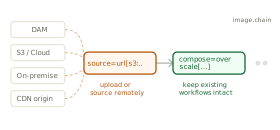
Assets stay where they are
LiquiFire sources from any accessible location — your DAM, a cloud storage bucket, a CDN, or an on-premise file server. Upload assets if you prefer, or source them remotely. Either way, no migration is required and existing workflows stay intact.
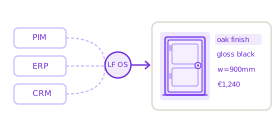
Live Data at Render Time
Variables from PIM, ERP, and CRM are injected per request. No static asset generation, no batch jobs.
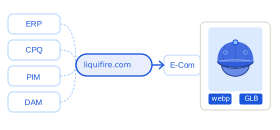
Headless by Default
No front-end dependency. LiquiFire integrates over HTTPS, JSON, and XML — embed in any commerce platform, DAM, ERP, or custom application without a dedicated SDK.
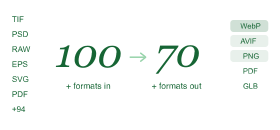
100+ in. 70+ out.
100+ input formats accepted, 70+ output formats delivered — including WebP, AVIF, PNG, JPEG, SVG, PDF, and 3D textures. No pre-conversion required.
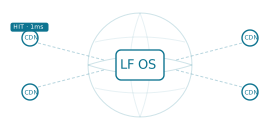
CDN-Native Caching
Rendered outputs are cache-addressable URLs. First render is generated; every subsequent hit is CDN-served.
White-Label & Embedded
Deploy under your own domain. Wrap the API in your product. LiquiFire is invisible to your end users.
Your infrastructure, your rules.
LiquiFire OS fits the infrastructure you already have, not the other way around.
Every organization has different requirements around data residency, security posture, and operational ownership. LiquiFire deploys five ways — SaaS, appliance, air-gapped, managed private cloud, or hybrid — so your architecture and procurement teams can always find a path forward.
SaaS.
API-first. Globally distributed. Zero infrastructure to operate. SaaS customers have been live in as little as one day.
Appliances.
Pre-configured hardware. Ships to your data center, runs on day one. Full LiquiFire OS on infrastructure you own.
Secure Appliances.
Hardened hardware for regulated and classified environments. No external network calls — ever. Defense, finance, healthcare.
Managed Hosting.
Dedicated LiquiFire environment in an isolated private cloud. We operate it. You own the data. On-premise control, SaaS convenience.
Hybrid.
Render sensitive assets on-site. Burst to cloud at peak. Sensitive data never leaves your network. One chain language across both tiers.
The visual experience every stakeholder expects.
Without the production overhead that it typically creates.
Every visual LiquiFire delivers comes from the same source data, rendered on demand. No asset library to maintain, no production sprint for every variant, no lag between what any stakeholder needs and what they actually see.
Conversion without compromise.
Your customers who can configure, zoom, rotate, and see exactly what they are buying convert at a higher rate and return less often. LiquiFire makes that experience available for every product in your catalog — not just the hero SKUs your creative team had time to shoot. Configurators, 360° views, and live variant rendering ship from a single chain, not a separate project per product line.
Visual operations at scale. Without the team to match.
Growing your catalog, entering new markets, or launching a new channel used to mean more creative production, more storage, more integrations to maintain. LiquiFire changes the ratio. Every system that calls a URL gets the right image for its context — the right size, format, and variant — generated on demand from the assets you already have. Your operations scale without your image pipeline scaling with them.
Your product, their brand. One source of truth.
Every distributor, reseller, and channel partner that carries your product is a brand experience you do not fully control — unless the visual layer is yours. LiquiFire renders your product in any partner's brand context, under any domain, without exposing your master assets or duplicating your production work. The product truth stays consistent. The brand experience belongs to whoever is selling it.
Visualization for every system that needs it.
The systems your business runs on were never designed for visual output. LiquiFire OS layers on top without touching them — consolidating separately licensed tools, eliminating duplicated integration work, and giving every team access to the same rendering capability from a single infrastructure.
Data as product image.
The image itself is the data output, rendered fresh on every request.
Turn live business data — inventory status, configuration options, material specs, variant state — directly into the visual any stakeholder sees, from the customer configuring to the warehouse team receiving to the compliance officer auditing. Not a chart. Not a badge overlay. The image is the data output, rendered fresh on every request from whatever system calls it.
See platform architectureBidirectional data flow.
Images that encode real information, and LiquiFire that can decode it.
LiquiFire reads barcodes and QR codes, fetches structured product data via GS1, and uses that data to generate new images carrying real information — actual colors, correct materials, normalized attributes, embedded icons. External vendor assets are pulled, validated, and standardized for vertical applications that expect a consistent format. In a world where data is king, LiquiFire handles both directions.
See LiquiFire ChainsLegacy systems, extended.
Add dynamic visual capability to systems never designed for it.
ERP, MES, WMS, and field service tools were built for data — not images. LiquiFire layers on top, letting those applications present live, personalized visual information without a rewrite. Developers add image upload, transformation, and delivery as an API call. The application lifecycle extends. The user experience modernizes. The codebase stays intact.
See manufacturingDelivered alongside these and many others, shaped by what each environment actually required.
A business case that holds. A return that compounds.
The case for LiquiFire OS is built on cost reduction and conversion lift. The value compounds from there — because every new use case runs on the same chain language, the same integration, and the same team knowledge. No new vendor, no new license, no new knowledge gap to fill every time the business needs something new.
Consolidate tools, licenses, and support into a single engine.
Most enterprises carry three to five separate image tools, each with its own license, integration overhead, and failure surface. LiquiFire consolidates that into a single rendering infrastructure.
The biggest returns that rarely make the business case.
The business case covers conversion lift and cost reduction. What compounds beyond that, across operations, supply chain, and channel growth, was never in the original proposal.
Evaluating LiquiFire OS against Cloudinary, Adobe Dynamic Media, or a custom-built pipeline? See how the architecture compares.
From business case to production. No handoff gaps.
The same knowledge that built your business case informs your architecture. The same team that designed your deployment supports it after go-live.
Consulting Services
Visual strategy, business case, platform evaluation, and stakeholder alignment. Where every engagement starts.
Consulting ServicesSolution Architecture
System design, deployment topology, HA/FO planning, and infrastructure decisions across every deployment model.
Solution ArchitectureProfessional Services
Chain development, system integration, configurator build-out, and team enablement. Architecture into production.
Professional ServicesEnterprise Support
Standard support, custom SLAs, and proactive monitoring. The same team that built it, supporting it.
Enterprise SupportWhat changes when LiquiFire OS goes live.


Herff Jones deployed LiquiFire OS to bring personalized class ring configuration online, giving students the same experience previously requiring a face-to-face session. When the digital experience matched the in-person one, the convenience of the online channel took over.

Chef Works deployed LiquiFire OS for visual embroidery configuration, letting customers see an accurate preview before committing. Conversion improved, returns dropped, and machine file output from the chain eliminated manual re-entry between online order and production.

Lionel Trains brought personalization in-house on LiquiFire OS, replacing a third-party arrangement that had constrained preview quality, product range, and production integrity. Each new product category extended the program without requiring proportional engineering effort.
See what fragmented visual work
is costing you.
Eight questions, drawn from 25 years of untangling visual work. You get back a document to take to your team and dig deeper on your own terms — a clear, shareable map of where visual production is duplicated, slow, or inconsistent. A helping hand from us, not a sales call.
Start the 8-question brief